

A lot of restaurants and hospitality operators are still running MICROS RES or MICROS 3700 hardware that has quietly done its job for years. The terminals boot up, the printers print, and the system gets through service. But hardware has a lifespan, and at a certain point, “it still works” and “it’s still supported” stop meaning the same thing.
The challenge for most operators isn’t deciding whether to eventually move on from older MICROS hardware. It’s figuring out which pieces need attention now, which ones can wait, and which ones are genuinely fine as they are. Replacing everything at once is expensive and disruptive. Replacing nothing until something fails during a Friday night rush is worse.
This guide walks through the MICROS hardware components most likely to be approaching end-of-life, the practical risks of running unsupported equipment, and a simple way to prioritize what to replace first without tearing your whole system out.
Why MICROS Hardware Age Matters More Than It Used To
Older MICROS RES and 3700 systems were built to be durable, and many of them have earned that reputation. But as this hardware ages, a few things change that are worth taking seriously.
Replacement parts get harder to find. As MICROS 3700 support becomes more specialized, sourcing an exact terminal board, printer part, or cash drawer mechanism takes longer, and repairs that used to be routine can turn into multi-day waits.
Security exposure increases. Older terminals and payment devices were built for the security standards of their time, not today’s. The PCI Security Standards Council has been clear that outdated payment hardware and unpatched systems are a common weak point for data breaches, which matters directly if any of your legacy MICROS terminals or card readers are still processing payments.
Downtime becomes more expensive. A terminal or printer failure at a single-location cafe is an inconvenience. The same failure during a packed Saturday dinner service, or across multiple locations, hits revenue and guest experience in a way that’s hard to recover from that same night. That’s part of why proactive support and managed services matter, catching a failing terminal or printer before it takes down a shift instead of after.
Vendor and software support narrows. As Oracle continues to shift its development focus toward Simphony, support resources, firmware updates, and compatible peripherals for legacy MICROS environments become more limited over time. That doesn’t mean legacy MICROS is unsupported today. It means the runway is shorter than it used to be.
None of this means every operator running legacy MICROS needs to panic or replace everything this quarter. It means hardware decisions deserve a closer look than “replace it when it breaks.”
The MICROS Hardware Components Worth a Closer Look
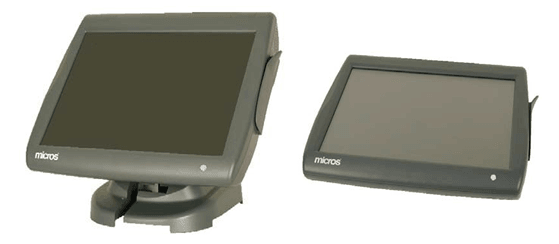
Not every piece of your MICROS setup ages at the same rate or carries the same risk. Here’s how the main components typically stack up.
Terminals
Your point of sale terminals are the most visible part of the system, and often the first thing operators think about when they hear “end-of-life.” Watch for:
- Slower boot times or frequent freezing during service
- Terminals running an operating system no longer receiving security updates
- Physical wear on touchscreens, cables, or mounting hardware
- Difficulty finding compatible replacement parts when something breaks
Legacy MICROS terminals that are still stable, still receiving basic support, and still performing reliably during peak service don’t need to be replaced just because they’re old. But terminals that are already showing intermittent issues are a different story. A terminal failure at the host stand or a service station doesn’t just slow down one transaction. It backs up the whole line behind it.
Printers
Kitchen and receipt printers take a beating. They run constantly, live in hot environments near the line, and tend to fail gradually rather than all at once. Signs that micros printer support is running thin include:
- Faded or inconsistent print quality from a worn print head
- Frequent paper jams or feed errors
- Printers requiring manual restarts multiple times per shift
- Difficulty sourcing compatible ribbons, paper, or replacement units
Printers are usually one of the more affordable pieces of hardware to replace, which makes them a good candidate to address early rather than waiting for a full failure mid-service.
Cash Drawers
Cash drawers are mechanically simple and tend to outlast almost everything else in a MICROS hardware setup. As long as the drawer opens reliably, the connection to the terminal is stable, and there’s no visible damage to the housing or wiring, most cash drawers are genuinely fine to leave alone. The exception is drawers with worn connectors that cause intermittent open failures, since that’s a service delay you can usually avoid with a low-cost replacement.
Card Readers and Payment Devices
This is the category that deserves the most attention, and usually the fastest action. Card readers and payment terminals sit at the center of PCI compliance, and older devices may not support current encryption standards, EMV (Europay, Mastercard, and Visa) requirements, or newer contactless and mobile wallet payment methods guests expect. If your payment hardware hasn’t been evaluated recently, it’s worth confirming it still meets current processing and security requirements rather than assuming it does. This is one area where “it still works” isn’t the same question as “is it still appropriate to use.”
Networking and Peripheral Hardware
Routers, switches, and other back-of-house networking equipment don’t get much attention until they cause a problem, but an aging or underpowered network is often the real reason a POS environment feels unreliable. If terminals are dropping connection to the server or reporting is inconsistent, the issue may not be the terminal itself.
A Simple Triage Framework: Replace Now, Monitor, or Fine As-Is
Rather than treating every piece of legacy MICROS hardware the same way, it helps to sort components into three categories.
Replace Now
- Card readers or payment devices that don’t support current encryption or EMV standards
- Terminals or printers that are already failing intermittently during service
- Any hardware where replacement parts are no longer realistically available
Monitor
- Terminals and printers that are stable but showing early wear
- Networking equipment that’s aging but still performing adequately
- Peripherals nearing the end of typical vendor support timelines, even if they’re currently working fine
Fine As-Is
- Cash drawers and peripherals with no signs of mechanical or connectivity issues
- Terminals and printers performing reliably with no recent service calls
- Hardware still fully within a supported lifecycle
This kind of triage lets you prioritize spending where it actually reduces risk, instead of replacing hardware that’s still doing its job or ignoring a payment device that genuinely needs attention.
Smart Questions to Ask Before You Replace Anything
Before committing to a POS hardware replacement plan, it helps to walk through a few questions with your team or your support partner:
- Which pieces of hardware have caused service interruptions in the last six months?
- Are our card readers and payment terminals still meeting current security and processing standards?
- Can we still source parts and support for our current MICROS 3700 or RES terminals?
- Would replacing a few specific components solve the actual problem, or does this point to a larger system conversation?
- What’s the real cost of downtime if this piece of hardware fails during a busy shift?
Why a Full System Overhaul Isn’t Always the Answer
It’s easy to assume that aging hardware means it’s time to replace the entire system. Sometimes that’s true, especially if an operation has outgrown legacy MICROS entirely and is ready for the centralized reporting and cloud flexibility of Oracle MICROS Simphony. But for a lot of operators, the more practical first step is addressing the specific terminals, printers, or payment devices that are actually creating risk right now.
Oracle Legacy MICROS Support can help you understand what’s still supportable in your current environment, while Oracle MICROS Simphony is worth a look if your team is already discussing a broader upgrade path. Either way, a hardware assessment gives you a clear, honest picture before you spend money in the wrong place.
Keeping Your MICROS Hardware Working for You, Not Against You
Legacy MICROS hardware doesn’t need to be replaced wholesale just because it’s aging. It needs an honest look at what’s genuinely at risk, what’s holding steady, and what can wait. A terminal that’s slowing down deserves attention. A cash drawer that’s opening the way it always has probably doesn’t.
DCRS has supported MICROS environments, including legacy RES and 3700 systems, since long before “end-of-life” was a phrase most operators worried about. If you’re not sure which parts of your setup need attention first, talk with DCRS about a MICROS hardware assessment. We’ll help you sort out what’s worth replacing now, what’s worth watching, and what’s genuinely fine as-is, so you can make decisions based on your actual equipment instead of guesswork.
Sign Up for our Newsletter